How to Identify the Reason for Deleted Scenes and Find Alternative Videos When Broadcast and Replay Versions Differ
When watching a television program, reality show, or live event, viewers are often surprised to find that a scene they recently saw on the live broadcast is completely missing from the replay version. This omission is rarely a technical glitch; rather, it stems from complex licensing agreements, regulatory censorship, and commercial distribution strategies. Understanding why a scene was cut allows you to locate full alternative video sources quickly without wasting time on low-quality pirated uploads or malicious links.
Root Causes Behind Discrepancies Between Broadcast and Replay Cuts
Each television distribution format operates under distinct legal and financial parameters. A segment approved for linear television transmission is not automatically licensed for permanent on-demand streaming across digital platforms.
Music and Third-Party Media Rights Barriers
Music licensing remains the single most common reason scenes are removed when content transitions from broadcast TV to digital video-on-demand (VOD). Production companies frequently purchase short-term synchronization licenses to broadcast a popular song during a live show. Acquiring perpetual, global digital distribution rights for OTT applications is significantly more costly.
When digital music rights cannot be secured, networks must either delete the segment entirely or replace the soundtrack with stock background audio, altering the mood of the original broadcast moment.
Broadcast Timing and Commercial Structure Requirements
Linear broadcast television adheres to rigid 30-minute or 60-minute programming blocks. Live broadcasts often feature impromptu talent banter, extended sponsor mentions, or extra filler segments designed to adjust for real-time commercial breaks. When preparing the episode for VOD replay, editors use a streamlined master cut that strips away live fluff and network sponsorship bumpers to deliver a tighter viewing experience.
Censorship & Regional Rights
Late-night broadcast regulations differ from free-access VOD standards. Content containing violence, explicit language, or dangerous stunts on broadcast TV may be re-edited for VOD replays to ensure compliance with general age ratings. Furthermore, brand integrations or guest appearances that are legal in the primary broadcast territory may violate exclusive sponsorship contracts in foreign markets, leading to region-specific scene omissions.
A 3-Step Protocol to Diagnose Why a Scene Was Cut
To determine whether a scene is missing due to intentional editing or a playback error, follow this three-step diagnostic workflow.
Step 1: Cross-Reference Replay Runtime Against Broadcast Logs
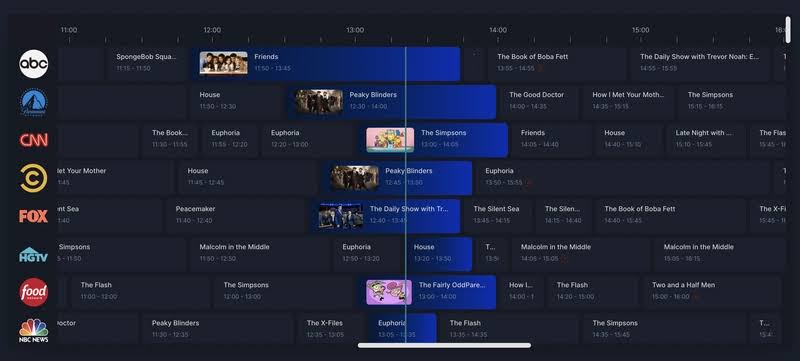
Verify the original broadcast duration listed on the television station’s Electronic Program Guide (EPG) or official episode listing.
- If a TV broadcast ran for 60 minutes (including commercial breaks) and the VOD replay lasts 42 to 45 minutes, this variance represents standard ad-break removal.
- If the VOD replay is significantly shorter (e.g., 30 to 35 minutes), one or more substantial narrative segments have been excised.
Step 2: Inspect Player Copyright Banners and Notice Labels
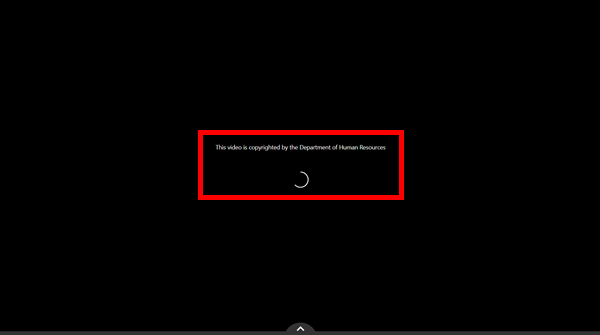
Reputable streaming platforms display notice labels within the video player UI or description box to clarify editorial adjustments:
- “Edited Version” / “Replay Cut”: Indicates the video stream has been edited relative to the original broadcast.
- “Edited for Rights Reason”: Confirms that specific segments were removed due to unresolved music or third-party archival licensing agreements.
- “Regional License Restriction”: Signals that certain scenes or entire episodes are geo-blocked in your region due to territorial licensing rules.
Step 3: Compare Replay Feeds Across Platforms and Geographic Regions
If you suspect a scene was cut due to regional censorship, check the episode listing on foreign partner platforms or international syndication channels. Additionally, networks occasionally remove sensitive scenes from their free ad-supported web players while retaining the full cut on premium, paid subscription tiers.
Proven Strategies to Find Alternative Video Sources Containing Deleted Scenes
When the official VOD replay on a network’s main portal has been trimmed, you can still access the complete scene through other legitimate distribution channels.
Explore “Extras” and “Uncut” Sections on Official Apps
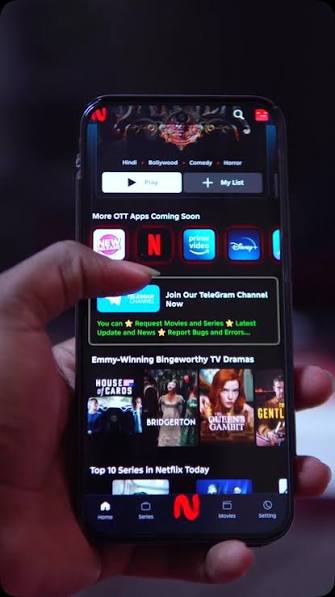
Broadcasters rarely throw away finished footage. They separate deleted scenes from the main replay stream and rebrand them as supplemental bonus content.
- Check navigation tabs labeled “Deleted Scenes,” “Uncut Moments,” “Behind the Scenes,” or “Extras” located directly beneath the main video player.
- Select apps allow users to toggle between two distinct master video streams: “Broadcast Version” and “Director’s Cut.”
Search Verified YouTube Channels and Official Social Outlets
Segments trimmed from VOD replays for runtime reasons are routinely repurposed by marketing teams as standalone promotional assets across social media.
- Effective Search Query: Search
[Program Title] + [Scene Keyword] + Official Clipdirectly on YouTube. - Check Official TikTok / Facebook Reels Outlets: Key TV moments are regularly edited into 9:16 vertical video formats. Official short-form channels host extensive libraries of scenes that no longer exist on long-form replay streams.
Locate Physical Media Releases (Blu-ray/DVD) and International Purchase Feeds
For major television series, physical media box sets (Blu-ray/DVD) and transactional digital purchases (TVOD storefronts like Apple TV or Amazon) offer the most complete cuts. Distributors bundle unedited broadcast masters and extended cuts into physical releases to incentivize collector purchases.
Compare Cut Reasons vs. Optimal Alternative Sources
| Diagnostic Indicator | Root Editing Cause | Primary Alternative Source |
|---|---|---|
| Replay runtime is 10–15 minutes shorter than standard | Live broadcast filler trimmed | “Extras” or “Live Highlights” tab on official network app |
| Audio track is altered, muted, or replaced | Expired digital music license | Official YouTube channel (standalone clips) or Blu-ray release |
| “Edited for Rights” disclaimer banner appears | Third-party image/footage restrictions | International partner streaming feeds or syndication broadcasts |
| Sensitive content is blurred or scene cut abruptly | Re-edited for VOD age classification | “Uncut” / “Director’s Cut” option on Premium subscription tiers |
Critical Pitfalls to Avoid When Searching for Deleted Scenes
Malicious actors frequently target keywords like [Show Title] full uncensored deleted scene to build deceptive websites containing malware or phishing scams. Many clips labeled “Full Uncut Scene” on social media are fan edits that loop footage, alter pitch, or use AI tools to artificially extend runtime. Always inspect the description box on official YouTube uploads. Broadcasters routinely provide direct links pointing to the complete, legal version of the deleted segment.
Discrepancies between live broadcasts and VOD replays are rarely accidental; they are driven by complex music rights, regional regulations, and platform-specific editing choices. By recognizing the root causes behind missing scenes and utilizing diagnostic steps such as checking runtime logs and platform labels you can quickly identify why a cut occurred.