
How to Find the Current Provider of a Program When Only Broadcast Clips Remain and Full-Episode Replays Have Disappeared
A short clip from a drama, variety show, documentary, or reality series may remain online long after the full episodes disappear from a streaming service. The clip could have been posted by a broadcaster, production company, fan account, news publisher, or licensed regional distributor.
Finding the program’s current provider requires two separate tasks. First, identify the exact title, season, or episode shown in the clip. Then check whether any service currently offers the full program in your country.
Do not assume that the logo visible in an old clip identifies the current streaming provider. It may only show the original broadcaster or the service that carried the program when the clip was created. Streaming availability changes over time and differs by region. Netflix, for example, confirms that licensed titles may be available only in selected countries or for a limited period.
Step-by-Step Guide to Tracing a Streaming Provider From a Short Clip
Use the clip to gather several independent clues. One watermark or database entry is rarely enough to establish current availability.
Step 1: Scan Visual Clues on the Video (Watermarks, Network Logos, Credits)
Network Logo or On-Screen Watermark: Check the corners of the frame, studio backdrop, subtitles, microphones, title cards, and lower-third captions. A logo may identify the original channel, regional broadcaster, clipping platform, or account that edited the footage.
Some clips have no original watermark because they have been cropped, mirrored, reformatted vertically, or covered with another account’s branding. A visible logo is therefore a useful lead, not conclusive evidence.
Uploader Handle and Description Box: Open the uploader’s profile and read the full caption, hashtags, playlist name, and linked website. A verified account can indicate that the profile is authentic, but verification does not prove that the account owns all underlying rights. A broadcaster may post a licensed clip without controlling streaming rights in every country.
End Credit Frame: Pause on production cards or end credits and record the title, broadcaster, production company, distributor, season, year, and copyright notice. These details help distinguish similarly named shows and regional remakes.
Step 2: Extract Metadata Identifiers Using Specialized Digital Tools
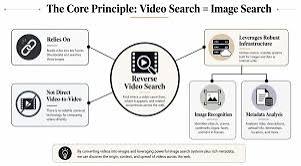
When the title is missing or written in an unfamiliar language, use several recognition methods rather than depending on one result.
Use Audio Recognition Software (Shazam / SoundHound): Shazam can identify music playing around you or inside apps such as TikTok, YouTube, and Instagram. However, it identifies the song or artist, not necessarily the television program. A commercial song may appear in hundreds of unrelated productions. Treat a recognized soundtrack as a search clue and combine it with dialogue, actors, or visual details.
Image Text Extraction (OCR) and Reverse Image Search: Capture a clear frame containing a title card, subtitle, location name, uniform, set design, or distinctive object. Google Lens can search using an image or screenshot and can copy or translate visible text. Results are generally more useful when the screenshot contains contextual details rather than only a tightly cropped face.
Search extracted dialogue in quotation marks. Try both the displayed translation and a short phrase in the original language when available.
Step 3: Cross-Reference Identifiers on Global Media Databases (TMDB, TVDB, IMDb)
Once you have a likely title, confirm the release year, cast, episode list, alternate titles, and country of origin.
The Movie Database (TMDB) & The TVDB: These databases can help identify original or translated titles, networks, seasons, and production information. TMDB also supplies country-specific watch-provider data through a partnership with JustWatch.
A listed network is not necessarily the service currently offering the program. It may identify the original broadcaster or an earlier distributor.
IMDb (Internet Movie Database): Company credits and distributor records can reveal past and present distribution relationships across territories and media. IMDb itself notes that a missing distributor entry does not prove that no distributor existed, and historical distributors remain listed with their applicable year ranges. Use the information to build a list of companies to investigate, not as final proof of current streaming availability.
Step 4: Verify Active Streaming Status via Aggregators (JustWatch, Reelgood)
Search the confirmed title on a streaming-availability service and select the correct country. JustWatch operates across more than 140 countries and separates availability into subscription, rental, purchase, and free-provider options. Its listings can change as provider catalogs change.
Reelgood also maintains provider data across multiple countries, although its coverage is smaller than JustWatch’s and may differ between its consumer product and commercial data services. Aggregators are discovery tools rather than rights certificates. Before subscribing or paying, open the provider’s official page and confirm that the title, season, audio language, and episode you need are currently available in your region.
Why Do Full-Episode Replays Suddenly Disappear?
A missing program is not always caused by a licensing expiration. It may also be hidden by profile settings, moved to another page, renamed, restricted by region, removed temporarily, or unavailable in the language selected for the account. Netflix lists regional rights, maturity settings, profile language, and VPN use among the possible reasons a title cannot be found.
1. Licensing Window Expiration
Streaming services often license programs from studios and distributors rather than owning permanent worldwide rights. When a license approaches expiration, the platform may consider whether the rights remain available, how popular the title is in that region, and how much renewal would cost.
There is no universal one-, three-, or five-year licensing period. Contract lengths vary and are usually not disclosed publicly.
2. Consolidation and Platform Exclusivity Shifts
A program may move when a rights holder changes its distribution strategy, signs an exclusive agreement, launches a new service, or licenses the catalog to another company.
It is inaccurate to assume that every removed show immediately appears on a studio-owned platform. A title may move to another provider, become available only for purchase, return to broadcast television, or remain unavailable while new rights are negotiated.
3. Geoblocking and Regional Distribution Boundaries
Streaming rights are commonly divided by territory. One company may control subscription streaming in one country while another controls broadcast, rental, or purchase rights elsewhere.
A clip uploaded by a viewer in another country may therefore promote a program that has no current licensed streaming provider in your location. Netflix confirms that its catalog varies by country and that another company may hold a title’s regional rights.
Advanced Tips for Tracing Hidden or Obscured Content
Reposted clips may contain cropped credits, replaced subtitles, changed playback speed, mirrored footage, or added music. These edits can make ordinary title searches less effective.
A clip may also show a scene that was shortened, removed, or replaced in the available replay edition. In that situation, use How to Identify the Reason for Deleted Scenes and Find Alternative Videos When Broadcast and Replay Versions Differ to determine whether you found the wrong episode, a regional edit, a music-rights revision, or a replay version with altered content.
Leverage Advanced Google Search Operators:
Search a distinctive line with quotation marks:
“exact line of dialogue” “TV show”
Combine a character, location, or occupation with the likely country:
“character name” hospital drama Korean series
Search a specific database or broadcaster:
site:imdb.com “Actor Name A” “Actor Name B”
Avoid adding a release year until you have evidence for it. An incorrect year can exclude the correct result.
Investigate Production Studio Catalogs:
Visit official broadcaster, distributor, or production-company websites and search their program archives. Use the company name found in the credits rather than guessing from the visual style.
A catalog can confirm that the company worked on the program, but an old project page does not prove that the company currently streams full episodes.
Query Crowdsourced Sourcing Communities:
Identification communities can help when automated searches fail. Provide a clear screenshot, approximate viewing date, language, dialogue, setting, and information about where the clip appeared.
Do not upload private information or copyrighted full episodes. Replies should be verified against cast lists, episode summaries, official clips, or provider pages. There is no guarantee that a community will identify the program within minutes.
How to Track and Archive Favorite Shows to Prevent Content Loss
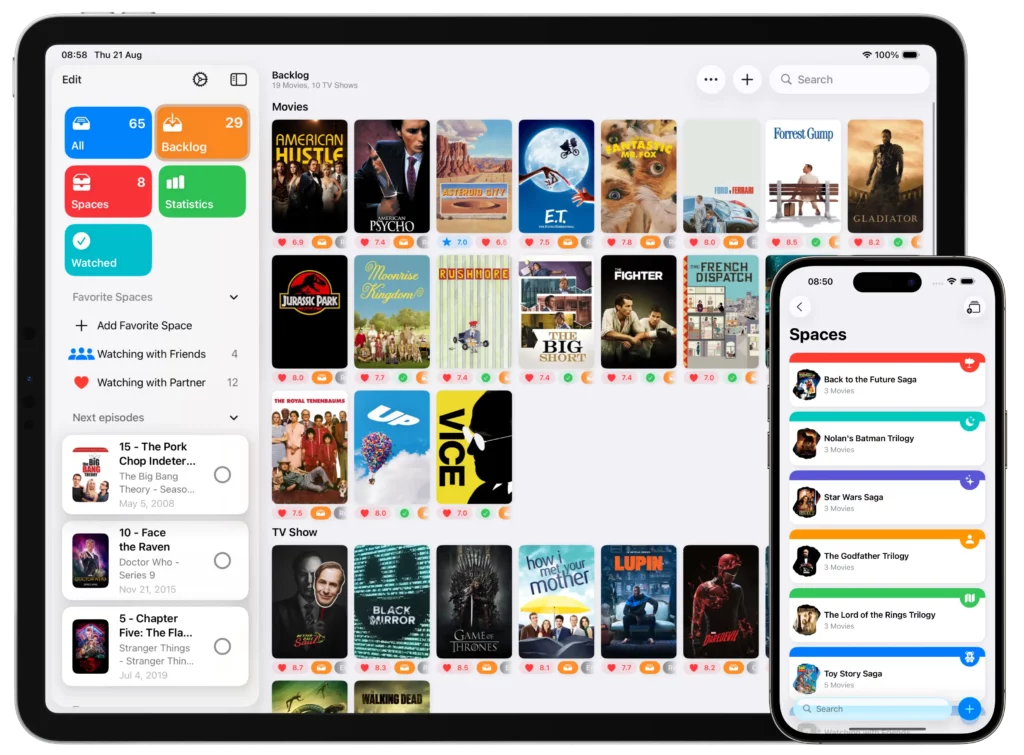
A watchlist preserves the title and your viewing progress even when a provider removes the program. It does not preserve access to the video itself.
Utilize Specialized Tracking Apps
Use a service that records the exact title, season, and episode rather than keeping only a bookmark to a provider page. Add alternate titles when the program is distributed under different names.
Do not assume that every media-tracking app sends regional provider-change alerts. Availability alerts are a separate feature and may depend on the service, country, membership plan, and notification settings.
Letterboxd, for example, offers paying members notifications when films on their watchlists arrive on selected favorite streaming services. Its feature applies to films and should not be presented as universal television-series tracking.
Enable JustWatch Alerts:
Add the title to a JustWatch watchlist and enable the relevant notifications. JustWatch states that users tracking a title can receive availability-change notifications when the feature is enabled. Alerts may arrive after the underlying catalog changes, so confirm availability directly with the provider before making a purchase or subscription decision.
Essential Copyright and Geoblocking Considerations for Online Viewers
Beware of Malicious Piracy Portals:
A search for a removed show may lead to websites or unofficial apps offering free access without identifying a licensed provider. Avoid entering account credentials, installing browser extensions, downloading unknown media players, or allowing notification permissions.
The US Federal Trade Commission has warned that illegal streaming apps and add-ons may distribute malware.
Understand VPN Terms of Service:
A VPN changes the location visible to a service, but it does not change the underlying licensing agreement. Platform rules and technical responses vary.
Netflix states that VPN users may see only titles for which it has global rights and that VPNs are unsupported for live events and ad-supported viewing. Check the current rules of the specific provider rather than assuming that a VPN will unlock another catalog.
Explore Free Ad-Supported TV (FAST) Channels:
Check legitimate ad-supported providers as part of the availability search. Older programs sometimes appear through free streaming services, broadcaster archives, or scheduled linear channels rather than subscription platforms.
Catalogs differ by country and change regularly. Confirm the title through the provider’s official site or app rather than assuming that every FAST service carries the same library.
When full-episode replays vanish and you are left with only a short video clip:
- Begin by scanning visual clues such as watermarks, titles, subtitles, and credits.
- Use music recognition and image search to identify possible titles, but verify the result through cast, episode, and production information.
- Treat TMDB, TVDB, and IMDb as identification and historical-reference tools rather than proof of current rights.
- Use a country-specific availability guide, then confirm the title directly on the official provider’s page.
Streaming catalogs change, and some programs may have no licensed full-episode provider in your region at a given time. Recording the exact title, season, episode, alternate name, and original broadcaster makes it much easier to locate the program again when availability changes.